Simple e2e Testing in Vue.js - Part II
 Let’s start creating our first tests. I confess, I had some problems performing unit tests through what the CLI provides, but I promised to bring an e2e test, and later I’ll actually perform unit tests with our components. Anyway, it happens, but the application must continue.
The idea is as follows: in this step, we’ll create a script for an e2e test, a kind of baby step. Our CLI already provides a good tool for this type of test - Nightwatch. However, it needs Java’s JVM to run Selenium. It creates a browser simulation - the idea is to simulate a browser and then run tests based on the URL passed to it and the other sequences, and this is with the help of Nightwatch. So at this stage you’ll need to install Java on your machine. It happens - the world isn’t perfect! lol just kidding!
Let’s continue. After installing Java on your machine (or if you already have it), let’s go to our test folder and enter the e2e folder, and open the nightwatch.conf.js file.
We’ll make some small changes. Currently, Chrome has a functionality in its browser that prevents simulating it. However, we can enable this to actually perform our test and see the actions according to our script. So let’s look at the nightwatch.conf.js file:
require('babel-register')
var config = require('../../config')

// http://nightwatchjs.org/gettingstarted#settings-file
module.exports = {
  src_folders: ['test/e2e/specs'],
  output_folder: 'test/e2e/reports',
  custom_assertions_path: ['test/e2e/custom-assertions'],

  selenium: {
    start_process: true,
    server_path: require('selenium-server').path,
    host: '127.0.0.1',
    port: 4444,
    cli_args: {
      'webdriver.chrome.driver': require('chromedriver').path
    }
  },

  test_settings: {
    default: {
      selenium_port: 4444,
      selenium_host: 'localhost',
      silent: true,
      globals: {
        devServerURL: 'http://localhost:' + (process.env.PORT || config.dev.port)
      }
    },

    chrome: {
      desiredCapabilities: {
        browserName: 'chrome',
        javascriptEnabled: true,
        acceptSslCerts: true,
        chromeOptions : {
          args : ["--no-sandbox"]
        }
      }
    },

    firefox: {
      desiredCapabilities: {
        browserName: 'firefox',
        javascriptEnabled: true,
        acceptSslCerts: true
      }
    }
  }
}
In this file we’ll make a small change for Google Chrome! Our configuration will look like this:
    chrome: {
      desiredCapabilities: {
        browserName: 'chrome',
        javascriptEnabled: true,
        acceptSslCerts: true,
        chromeOptions : {
          args : ["--no-sandbox"]
        }
      }
    },
What we added is chromeOptions! We pass only one argument allowing us to emulate a new browser page for testing with Chrome.
After this step, what we’ll work on is - if we look closely at our application, it does the following actions: it can create a new element in our task list. What we’ll do is create an action script, and in this script we’ll first access the browser URL, count how many tasks we have at the first moment, add one more task and count how many there are at this second moment, and finally remove this task and count how many there are in total - it should have the same amount as the beginning.
For this, let’s go to another folder. In our test directory, let’s go to spec. Inside it there’s a file called test.js - this is the file where we’ll work on our script, and we’ll do it in three parts. First I want to go to the page and count how many elements I have in my list, how many li I have. How will I do this? I’ll go to browser and delete everything below it, it will look like this:
module.exports = {
  'default e2e tests': function (browser) {
    // automatically uses dev Server port from /config.index.js
    // default: http://localhost:8080
    // see nightwatch.conf.js
    const devServer = browser.globals.devServerURL

    browser

        /* Vamos escrever nosso roteiro aqui! */

      .end()
  }
}
Now let’s do the following: I want to execute what we had planned, access the URL, and count how many li I have - in this case 3. And I’ll add two more things to this task list: I want to see if it picks up our h1 with the text Hey and the title of our page. That will be our test:
module.exports = {
  'default e2e tests': function (browser) {
    // automatically uses dev Server port from /config.index.js
    // default: http://localhost:8080
    // see nightwatch.conf.js
    const devServer = browser.globals.devServerURL

    browser
      .url(devServer)
      .assert.title('To do List!')
      .pause(1000)
      .assert.containsText('h1', 'Hey')
      .assert.elementCount('li', 3)
      .end()
  }
}
And let’s run our test:
sudo npm run e2e
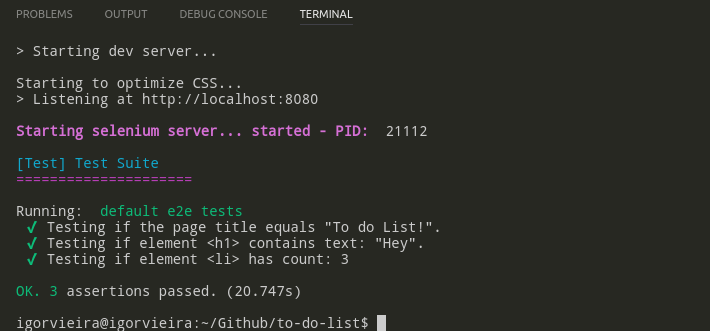
If you watch, it will open an instance with Selenium and will emulate actions with Chrome. At the end it will give the result of our tests, and as such, it passed:
What we’ll do now is add a new task and count how many elements are in our task list:
module.exports = {
  'default e2e tests': function (browser) {
    // automatically uses dev Server port from /config.index.js
    // default: http://localhost:8080
    // see nightwatch.conf.js
    const devServer = browser.globals.devServerURL

    browser
     .url(devServer)
      .assert.title('To do List!')
      .pause(1000)
      .assert.containsText('h1', 'Hey')
      .assert.elementCount('li', 3)
      .setValue('input[type=text]', 'Make a coffee')
      .click('input[type=checkbox]')
      .pause(1000)
      .click('button[name=add]')
      .pause(2000)
      .end()
  }
}
What we did was set a value for our text input, adding a value to its value, and also assigning a value to its checkbox, giving it the value of true. We’ll take advantage of our button’s name attribute and use it for the click - very important!
When we trigger a test on a click event, we should place a pause after this event, because a click is very fast, but depending on the situation it’s not as fast as Selenium is when testing a view. So to ensure that we actually have the click event, we add the pause event.
Let’s run our test again:
sudo npm run e2e
And it passed:

Finally, let’s delete the last value added and count the elements of our list, like this:
browser
      .url(devServer)
      .assert.title('To do List!')
      .pause(1000)
      .assert.containsText('h1', 'Hey')
      .assert.elementCount('li', 3)
      .setValue('input[type=text]', 'Make a coffee')
      .setValue('input[type=checkbox]', true)
      .click('button[name=add]')
      .pause(2000)
      .assert.elementCount('li', 4)
      .click('.fa-trash')
      .pause(2000)
      .assert.elementCount('li', 3)
      .end()
Let’s run our test again:
sudo npm run e2e
And it passed:

Well, this was our test script with Selenium and Nightwatch. We managed to test all the functionality and some elements of our application, ensuring our software works properly. And that’s it! Thursday, probably Thursday, we’ll have another post. If not, Friday, but no later than Friday. Thanks again and see you later! =]